Security testing for web apps, APIs, and AI systems.
Run repeatable scans, investigate targets with your AI coding agent, and review findings with supporting evidence, all from your own environment.
curl -fsSL https://install.shakerscan.com | shThen open http://localhost:3000. The installer places ShakerScan under your home directory, creates the shakerscan command, and binds the UI and API to localhost.
Only test systems you own or are explicitly authorized to assess. Active testing can change application state, generate traffic, and trigger defenses.
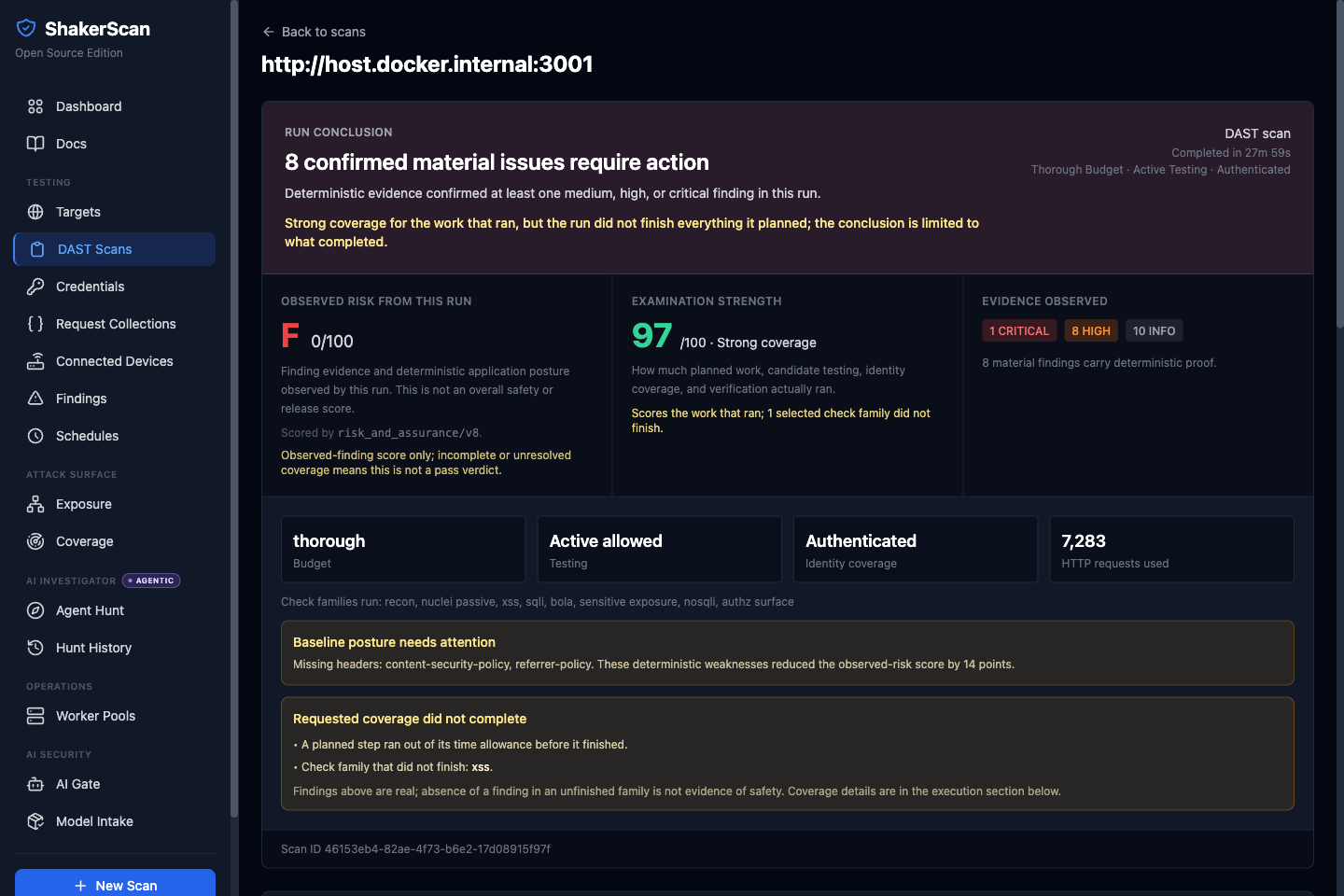
Three outcomes, one self-hosted workspace.
Run repeatable security scans
Test web applications and APIs, from fast posture checks to explicitly authorized active testing.
Explore ScanInvestigate with your AI agent
Use Hunt with Codex, Claude Code, or OpenCode to adaptively investigate a registered target while ShakerScan controls scope, budgets, execution, and evidence.
Explore HuntReview evidence and track fixes
Keep findings, supporting evidence, retests, and testing history together instead of losing context across individual scanner runs.
See the findings workflowTwo workflows. One record of findings and evidence.
Scan, ShakerScan’s repeatable automated security-testing workflow, gives you deterministic coverage. Hunt, ShakerScan’s AI-assisted investigation workflow, lets a supported coding agent adapt to what it finds. Both feed the same findings, evidence, retests, and testing history, inside the same authorization boundary.
| Scan | Hunt | |
|---|---|---|
| Best for | Repeatable automated testing | Adaptive investigation |
| Behavior | Deterministic pipeline | AI-planned investigation |
| AI required | No | Yes, your coding agent |
| You control | Target, budget, active-testing authorization | Target, capabilities, approvals, budgets |
| Output | Findings, evidence, coverage | Leads, findings, evidence, investigation history |
Beyond web DAST.
Not ready to install? Check a domain first.
DNS, email, HTTP, and TLS facts for any public domain or IP address, measured by the same engine as a self-hosted instance. No account and no pass/fail scores, just what was observed; the hosted service applies per-IP rate limits.
or from a terminal: $ shakerscan check example.com
Scan does not require AI. Hunt uses the agent you choose.
Scans work without an AI agent. Hunt adds adaptive investigation through Codex, Claude Code, or OpenCode when you choose to use it. Your current agent session is the planner, so ShakerScan stores no separate LLM API key, and every action still passes through scope, budget, and approval checks.
Read the Hunt authorization workflowYour deployment holds the data.
ShakerScan stores its project data, scan results, and evidence in your deployment and sends no telemetry. Outbound traffic you should know about: image pulls from Docker Hub, public DNS-over-HTTPS fallback for public names, optional threat-intel lookups, and optional AI features, which use the agent or model provider you configure.
Built to be inspected.
Open source
AGPL-3.0, developed in the open, with releases built once from an exact source revision.
Evidence
Severity and proof state are separate. A label or an HTTP 200 never counts as exploit proof.
Authorization
Active testing is off by default. Active Hunt capabilities need a target-bound approval, revalidated on every call.
Public security model
Authorization behavior, Hunt boundaries, and the Fleet trust model are documented in the repository.
Need SSO, organizational controls, or support?
ShakerScan Enterprise puts the open-source engine behind single sign-on, roles, audit, and an offline licence on your own host. The self-hosted edition is in public beta; managed hosting is in development. Pilots are open.
Common questions.
Is ShakerScan open source?
Yes. ShakerScan is licensed under the GNU Affero General Public License v3.0 and developed in the open at github.com/andriyze/shakerscan, where releases, issues, and the security policy live.
Does ShakerScan require AI?
No. Scan is a repeatable security-testing workflow that does not require an AI model. Hunt is an optional AI-assisted workflow that uses the Codex, Claude Code, or OpenCode session you already run.
Where does ShakerScan run?
In Docker on infrastructure you control: locally on Linux or macOS, on Windows through WSL2, or on a VPS in a Tailscale-bound remote mode. The UI and API bind to localhost by default. A trusted-LAN mode lets a laptop client drive an engine on another machine; it adds no authentication or encryption. Optional multi-node Fleet adds Linux workers over outbound-only HTTPS.
What is the difference between ShakerScan Open Source and Enterprise?
The open-source release is the complete platform: web UI, API, CLI, Scan, Hunt, findings, evidence, Continuous ASM, AI Gate and Model Intake previews, connected devices, and Fleet. Enterprise is a self-hosted edition, in public beta, that puts the open-source engine behind single sign-on, roles, audit, and an offline licence; managed hosting is in development.
Can I run ShakerScan in CI?
Yes, against an engine you run. Install the engine-less client with pipx install shakerscan, submit with shakerscan scan --json, and gate on the deployment-decision endpoint; the scanner CLI can also write SARIF 2.1. There is no hosted scanning service and no packaged CI action.
Can ShakerScan replace a penetration tester?
No. ShakerScan automates and assists security testing. Hunt is designed to make a human security workflow more effective, not to replace expert judgment.
Run ShakerScan on an authorized target.
One command installs the stack. The first scan needs no account, no email, and no AI key.
curl -fsSL https://install.shakerscan.com | sh